Every student can follow along.
Transcribe on your own machine, carry multiple languages in one project, and keep every hand correction you make — even when you transcribe again. Captions here are a first-class track, not an afterthought.
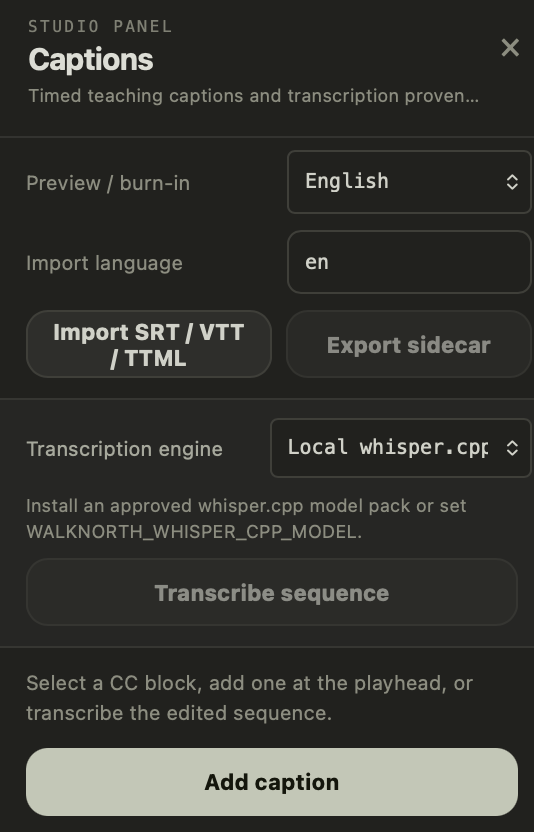
Transcribe the edited sequence with a local whisper.cpp model pack — audio never leaves your machine. Prefer a cloud engine? It's there too, behind an explicit consent and PHI warning.
Keep English, Hindi, Spanish — as many language tracks as your audience needs — side by side. Preview or burn in whichever one you choose; export the rest as sidecars.
Import and export SRT, WebVTT, and clock-timed TTML. Whatever your LMS, player, or broadcaster asks for, the sidecar is one click away.
Spent an hour correcting names and terms? Re-import or retranscribe and Studio preserves your human corrections instead of steamrolling them with fresh machine output.
Retime cues on the CC track, split and merge them, label speakers, and style with branded presets. Captions ripple with your trims and travel with reordered clips.
One report flags overlapping cues, reading speeds that outrun your viewers, over-long lines, and safe-area violations — each finding pointing at the exact cue to fix.
Edit the words, and the timeline follows.
Read your lesson as text, strike the rambles and false starts, and Studio turns those deletions into reviewable edit groups on the timeline — the fastest way to tighten a long teaching take without scrubbing through it.